Patterns · Data
ActivityFeed
Since v0.0.1
Chronological list of activity events with avatar, description, and timestamp.
import { ActivityFeed } from '@nexub/patterns';Examples
Default
Groups, tones and actions
`ActivityFeed.Group` headers, `Date` timestamps (focus one for the full date), `tone` dots and a menu per item.
Props
| Prop | Type | Default | Description |
|---|---|---|---|
| ActivityFeedItem titlerequired | React.ReactNode | — | Activity event title. Block content is fine (a div since 11.5). |
| ActivityFeedItem description | React.ReactNode | — | Supporting description. Block content is fine (a div since 11.5). |
| ActivityFeedItem timestamp | ReactNode | Date | — | Text as given (e.g. "2 hours ago"), or (11.5) a Date: shown in <time dateTime> as relative text, a short date after a week, with the full date in a tooltip on hover or focus. |
| ActivityFeedItem actions | React.ReactNode | — | 11.5. Trailing controls, e.g. an IconButton or a menu trigger. |
| ActivityFeedItem tone | 'neutral' | 'info' | 'success' | 'warning' | 'danger' | — | 11.5. A coloured dot in place of the avatar, or a badge on it. Decorative: say what happened in the title. |
| ActivityFeedGroup labelrequired | React.ReactNode | — | 11.5. ActivityFeed.Group header, e.g. "Today"; it names the group’s list. |
| ActivityFeedGroup headingLevel | 2 | 3 | 4 | 5 | 6 | — | 11.5. Renders the header as a heading for heading navigation. Default: a plain div. |
| ActivityFeedItem avatar | React.ReactNode | — | Avatar element for the actor. |
| emptyState | React.ReactNode | — | Shown when there are no items. |
| errorState | React.ReactNode | — | Shown in place of the items; wins over loading and emptyState. |
| loading | boolean | — | 10.5: shows skeleton rows in place of the items and sets aria-busy. |
| loadingRows | number | 3 | Skeleton rows while loading. |
On iOS & Android: ActivityList
@nexub/react-native/patternsAlpha
import { ActivityList } from '@nexub/react-native/patterns';

<ActivityList transactions={txs} onPress={openTx} onRefresh={refetch} refreshing={loading} />
Web vs mobile
Same tokens and prop names. Where the platforms differ:
| Web | iOS & Android | |
|---|---|---|
| Row actions | Buttons or a menu on each row. | Swipe actions (also accessibility actions) via actions. |
| Loading more | Pagination or a "Load more" button. | Pull to refresh (onRefresh) and onEndReached for infinite scroll. |
Interactive preview of @nexub/react-native rendered for the web. Native chrome (switches, pickers, Liquid Glass) looks like the platform on a device.
On device
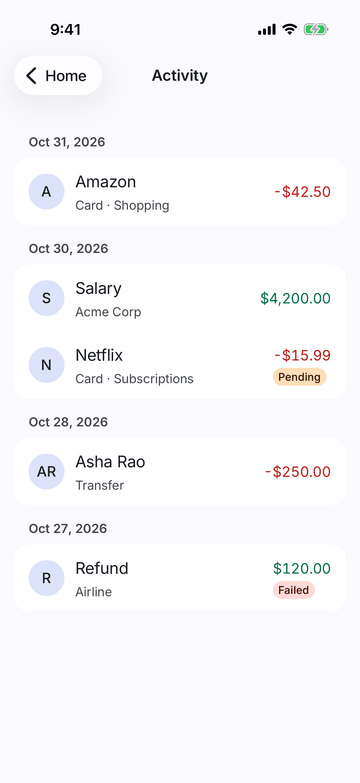
iPhone (iOS simulator)
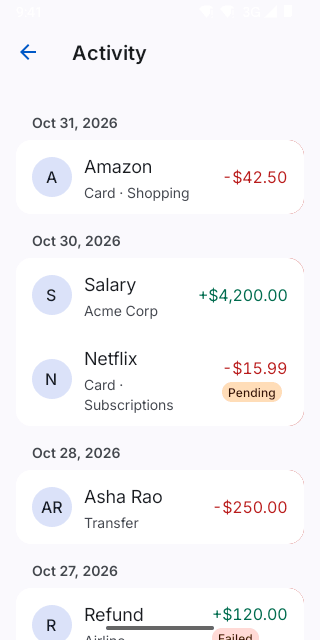
Pixel (Android emulator)
Screenshots from the latest CI run of the showcase app; the live frame renders the same code for the web.
ActivityList props
| Prop | Type | Default | Description |
|---|---|---|---|
| transactionsrequired | Transaction[] | — | — |
| onPress | (t: Transaction) => void | — | — |
| onRefresh | () => void | — | — |
| refreshing | boolean | false | — |
| onEndReached | () => void | — | — |
| actions | (t: Transaction) => SwipeAction[] | — | Swipe actions per row (also accessibility actions). |
| header | React.ReactElement | — | — |
| empty | React.ReactElement | — | Shown when there are no transactions. Same as emptyState, which wins. |
| emptyState | React.ReactElement | "No activity yet" | Shown when there are no transactions, e.g. an EmptyState with a call to action. |
| errorState | React.ReactElement | — | Shown in place of the list when a load failed, e.g. an ErrorState with a retry. Wins over loading and the empty state. |
| loading | boolean | false | Shows skeleton rows in place of the transactions and marks the list busy for screen readers. |
| loadingRows | number | 3 | Skeleton rows while loading. |