Patterns · Data
StatusSteps
Since v10.7.0
A read-only list of steps showing where something stands: done, current, upcoming or a problem.
import { StatusSteps } from '@nexub/patterns';Examples
Application review
With a problem
Props
| Prop | Type | Default | Description |
|---|---|---|---|
| stepsrequired | StatusStep[] | — | The steps, first to last. |
| aria-labelrequired | string | — | Names the list. aria-labelledby works too. |
| size | 'sm' | 'md' | 'md' | Marker, type and spacing. |
On iOS & Android: StatusSteps
@nexub/react-native/patternsAlpha
import { StatusSteps } from '@nexub/react-native/patterns';

<StatusSteps accessibilityLabel="Application status" steps={steps} />
Web vs mobile
Same tokens and prop names. Where the platforms differ:
| Web | iOS & Android | |
|---|---|---|
| Screen readers | An ordered list; each title is prefixed with its status. | Each step is one element: "completed: Application sent, Mon 10:30". Its action stays a separate element. |
| Name | aria-label or aria-labelledby. | accessibilityLabel (required). |
Interactive preview of @nexub/react-native rendered for the web. Native chrome (switches, pickers, Liquid Glass) looks like the platform on a device.
On device
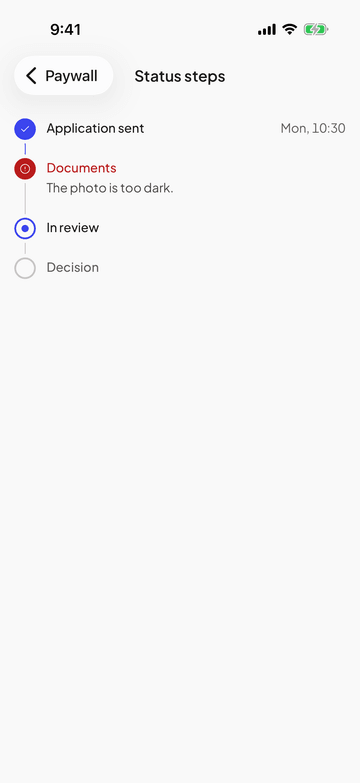
iPhone (iOS simulator)
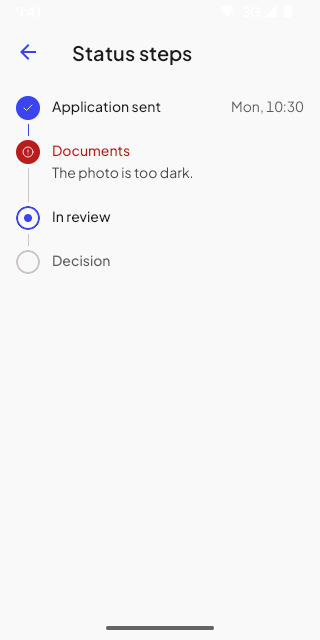
Pixel (Android emulator)
Screenshots from the latest CI run of the showcase app; the live frame renders the same code for the web.
StatusSteps props
| Prop | Type | Default | Description |
|---|---|---|---|
| stepsrequired | StatusStep[] | — | — |
| size | 'sm' | 'md' | 'md' | — |
| accessibilityLabelrequired | string | — | Names the list for screen readers, e.g. "Application status". |