Components · Mobile only · Inputs
File List
AlphaiOS & Android
Files picked for upload with progress, errors and remove or cancel. Bring your own picker (expo-document-picker).
Usage
@nexub/react-nativeWeb: FileUpload
import { FileList } from '@nexub/react-native';

<FileList files={files} onAdd={pick} onRemove={remove} onCancel={cancel} />Interactive preview of @nexub/react-native rendered for the web. Native chrome (switches, pickers, Liquid Glass) looks like the platform on a device.
On device
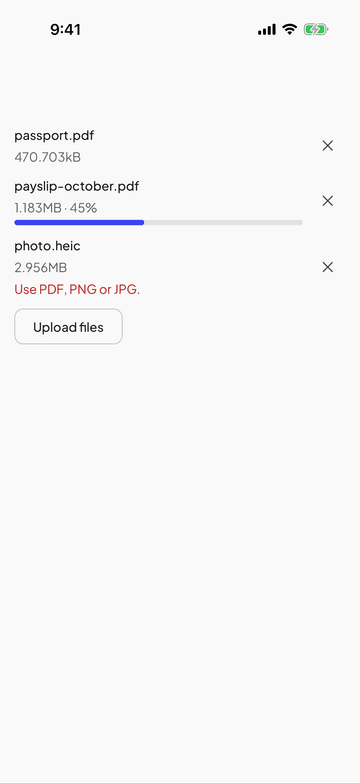
iPhone (iOS simulator)
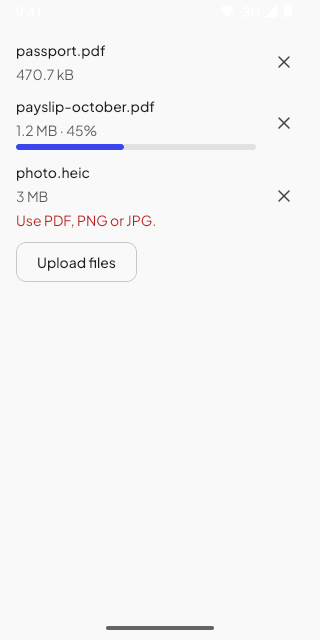
Pixel (Android emulator)
Screenshots from the latest CI run of the showcase app; the live frame renders the same code for the web.
FileList props
| Prop | Type | Default | Description |
|---|---|---|---|
| filesrequired | FileListItem[] | — | — |
| onAdd | () => void | — | Opens your picker (expo-document-picker, image picker…); add what it returns to files. |
| onRemove | (id: string) => void | — | — |
| onCancel | (id: string) => void | — | Stops an upload in progress. |
| addLabel | string | — | — |
| style | StyleProp<ViewStyle> | — | — |